CI from a repo
The pipeline lives in your repo, usually at .spool/ci.yaml, and each
build uses the version from the commit being built. spool repo connect
connects a repo so every push builds; spool submit --repo-path runs a
pipeline from the repo on demand. For a step-by-step first setup, see
Building a GitHub repo. This page is the
reference for how those builds work.
Run one automatically on every push
Section titled “Run one automatically on every push”To run your tests on every push to main (or any branch), connect the repo with spool repo connect.
On GitHub, install the Hyperspool GitHub App on the repo first
(Settings > Connections > Repositories > Install the GitHub App),
and the command needs nothing else:
spool repo connect https://github.com/me/appThe app delivers the repo’s pushes and posts the build results, so there is nothing to paste; Connect through the GitHub App covers what it does. Without the app, and on Gitea or Forgejo, give it two credentials instead:
spool repo connect https://github.com/me/app --repo-credential gh-read \ --status-credential github-statusThat prints an ingest URL, a signing secret, and the page to paste them
into (below). Settings > Connections >
Repositories in the console does either with a form, spool repo list
lists connected repos, and spool repo disconnect me/app removes one.
push -> webhook -> github.push -> build handler -> your pipeline | status handler posts the resultWhat it creates:
- One webhook per forge, named after the host (
githubfor github.com). Every repo you connect on that forge shares it, so the next repo prints no new secret: give its forge webhook the same URL and secret. Through the GitHub App, the app delivers to it and there is no secret at all. The build handler picks its own repo’s deliveries out by the repo name. - A build handler,
<owner>-<name>-ci, ongithub.push. It clones the pushed commit, reads each pipeline file in.spool/from that checkout, and starts each as a run of its own. It is acodestep, so it needspolyglot, which the managed environments provide. - A status handler,
<owner>-<name>-status, when you pass--status-credentialor connect through the app. It reports each build on the commit; see commit statuses. Without it, nothing reports back to the commit, andrepo connectsays so.
--repo-credential names the project credential the clone uses; leave
it out for a public repo. It needs read access to the repo’s contents,
and the status credential needs to write commit statuses. The clone
happens on an agent, so Hyperspool’s own servers never read your code
for these builds; they see the push delivery and the runs.
Run repo connect again to change anything (the path, the filter, a
rotated credential): the names are derived from the repo, so it updates
what is there rather than adding a second set, and the webhook keeps its
secret.
What the build handler starts
Section titled “What the build handler starts”The handler writes the delivered commit into each file as its input and
starts it with spool spawn, tagged repo:<owner/name>, sha:<commit>
and from-repo-add. The pipeline’s input:
| Field | On a push | On a pull request |
|---|---|---|
input.event |
push |
pull_request |
input.sha |
the pushed commit | the pull request’s head commit |
input.ref |
the pushed ref, refs/heads/main |
refs/pull/<n>/head |
input.repo |
owner/name |
owner/name |
input.number |
absent | the pull request’s number |
input.head_ref |
absent | the source branch, feature-x |
input.base_ref |
absent | the target branch, main |
The run gets none of the push’s CI_TRIGGER_* variables and no
event. It was started by the handler (CI_TRIGGER_EVENT is spawn),
and knows the push only through input.
The pipeline has to clone the repo itself, since its jobs run wherever
an agent picks them up. spool checkout clones the run’s repo at its
commit, with the credential the repo was connected with, as in
the quickstart. A pipeline
that clones by hand reads the input through has()
(has(input.sha) ? input.sha : '') so the same file also runs from a
manual spool submit, which has no sha.
A top-level if:, paths: or paths_ignore: in the file has no
effect, because the push isn’t delivered to the pipeline. Filter with
--when instead.
The file may also be a graph document (version: hyperspool-graph/v1, YAML or JSON). It runs as a graph, with the same
input.
Which files build
Section titled “Which files build”Every .spool/*.yaml and .spool/*.yml in the commit builds, each as
a run of its own with its own status context, hyperspool/<name>.
--repo-path builds one file instead.
Some files are skipped, and the build handler’s log says why:
- a file whose name has characters other than letters, digits,
.,_and-; - a second file with the same name, such as
ci.ymlbesideci.yaml; - a symlink.
Keep a file that shouldn’t build on every push, such as a deploy
pipeline you start with spool submit --repo-path, outside .spool/.
Commit statuses
Section titled “Commit statuses”The status handler posts each build’s progress on the commit, under the
context hyperspool/<file> (hyperspool/ci for .spool/ci.yaml),
with a link to the run:
| When | State | Description |
|---|---|---|
| The build starts | pending |
Build running |
| It succeeds | success |
Build passed |
| It fails | failure |
Build failed |
| It is cancelled | error |
Build cancelled |
| The build handler fails before starting it (no pipeline file, a failed clone, a refused credential) | error |
The build could not start |
--when declines the delivery |
success |
skipped |
--when fails to evaluate |
error |
The build’s filter failed on this delivery |
A run waiting on an approval stays pending.
Hyperspool posts these itself, with the status credential, from what it knows: the delivered commit, the file and how the build ended. The build never holds the credential, which is how a fork’s pull request gets a status too.
The two skipped rows keep a required check from waiting on a build that
isn’t coming. They are posted only for a trusted delivery whose commit
has no build yet, under the context of the file --repo-path names, or
else of the files the repo’s latest trusted build ran (hyperspool/ci
before there was one).
To make a status gate merges, require its context in the branch’s protection rules on the forge.
Choose which pushes build
Section titled “Choose which pushes build”Deleting a branch or a tag never starts a build: there’s no commit to
build. --when narrows it further.
--when is a CEL expression over the delivery event, checked when it
arrives. A delivery it declines starts nothing:
spool repo connect https://github.com/me/app --repo-credential gh-read \ --status-credential github-status \ --when 'event.ref == "refs/heads/main" || event.ref.startsWith("refs/tags/v")'It is combined with the repo’s own test, so it can narrow the handler but never widen it to another repo. The fields it can read:
| Field | On a push | On a pull request |
|---|---|---|
event.type |
github.push |
github.pull_request.opened, .synchronize, .reopened |
event.key, event.repo |
the repo, owner/name |
the repo, owner/name |
event.ref |
refs/heads/main, refs/tags/v1.2.0 |
absent |
event.sha |
the pushed commit | the head commit |
event.number |
absent | the pull request’s number |
event.head_ref |
absent | the source branch |
event.base_ref |
absent | the target branch |
event.sender |
who pushed | who triggered the delivery |
event.paths |
the files the push touched | empty |
event.paths_known |
false when the forge sent no file list, or too many commits to list | false |
event.payload.body |
the delivery as the forge sent it | the delivery as the forge sent it |
For path filters, let an unknown file list through:
--when '!event.paths_known || event.paths.exists(p, p.startsWith("api/"))'Without the !event.paths_known ||, a push with no file list would
never build, and neither would a pull request.
repo connect refuses a --when that doesn’t compile or reads anything
but event. One that fails while evaluating, for example by comparing a
field the event doesn’t have, skips the delivery. With
--pull-requests, that includes event.ref on every pull request, so
branch on the kind first:
--when 'has(event.number) ? event.base_ref == "main" : event.ref == "refs/heads/main"'``` [Branch routing](/branch-routing/) covers deciding whatruns once a build has started.
## Connect through the GitHub App
The Hyperspool GitHub App replaces the tokens and the pasted webhook forrepos on github.com. You install it on a GitHub account once, choosewhich of its repos the app may see, and link the installation to yourHyperspool org; then `repo connect` with no credentials, or **Connect**on the console's Repositories tab, connects any of those repos.
**Install the GitHub App**, under Settings > Connections > Repositories,sends you to GitHub, where you pick the account and the repos andauthorize the app. GitHub sends you back to the console, whichlinks the installation to your org. Linking takes an org admin here, andthe GitHub account that authorizes the app has to own the account it isinstalled on: be that account, or an owner of that GitHub organization.An installation belongs to one Hyperspool org.
The app sends the pushes and pull requests of the repos it may see toone Hyperspool endpoint, which checks each against the app's own secretand passes it to the `github` webhook of every project that connectedthat repo. A repo the app sees but no project connected starts nothing.`spool webhook deliveries github` lists them as it does for a pastedwebhook. In a project whose `github` webhook already takes deliveriesfrom a webhook you pasted, the app gets a webhook of its own,`github-app`, so a repo covered by both doesn't build twice.
For a private repo, each job that clones gets a token for that one repo,made by the app when the job starts and lasting at least 45 minutes, andthe statushandler posts with one the same way. A public repo clones with no token,so a fork's pull request, which runs without credentials, still builds.A step that needs the token itself can name it under `credentials:` as`github-app:<owner>/<name>`, for a repo this project connected throughthe app.
`repo connect` uses the app for a github.com repo it is installed onwhen no credential is given. `--github-app` insists on it and says whatis missing when it can't be used; a credential or `--no-github-app`connects with tokens instead.
Pull requests are trusted the same way as with a pasted webhook; see[who is trusted](#who-is-trusted).
Removing the app from a repo or uninstalling it stops that repo'sdeliveries, and a job that asks for its token fails saying the app wasremoved. Connecting the repo again with a credential takes it off the app:its deliveries stop arriving through the app, and its `github-app:` namestops working.
## Point the repo at the webhook
Without the GitHub App, the repo's webhook is yours to add.`repo connect` prints the ingest URL and the signing secret once. TheURL is also on the webhook's row under Settings > Connections >Webhooks and in `spool webhook get github`; the secret is not, so keepit. On the forge, either paste them in or, with a token, haveHyperspool register the webhook.
### Paste it in
On GitHub, at `https://github.com/<owner>/<repo>/settings/hooks/new`:
| Field | Value ||---|---|| Payload URL | the ingest URL || Content type | `application/json` || Secret | the signing secret || Events | Pushes, plus Pull requests if you build them |
A webhook on a GitHub org (the org's Settings > Webhooks) delivers forevery repo in the org, so each further repo there needs only`repo connect`.
### Or let Hyperspool register it
Hyperspool can create the webhook through the forge's API. It needs aforge token that may manage webhooks, which is more setup than a pastefor one repo and less for twenty.
1. Store the token as a bearer credential, under Settings > Connections   > Credentials or with the CLI:
```sh spool credential set forge-admin --kind bearer # prompts for the token-
Under Settings > Connections > Webhooks, the webhook’s row has Register on forge. Pick the forge, enter the repo as
owner/nameand choose the credential. Hyperspool creates the webhook with the signing secret filled in server-side, so the secret never passes through your browser.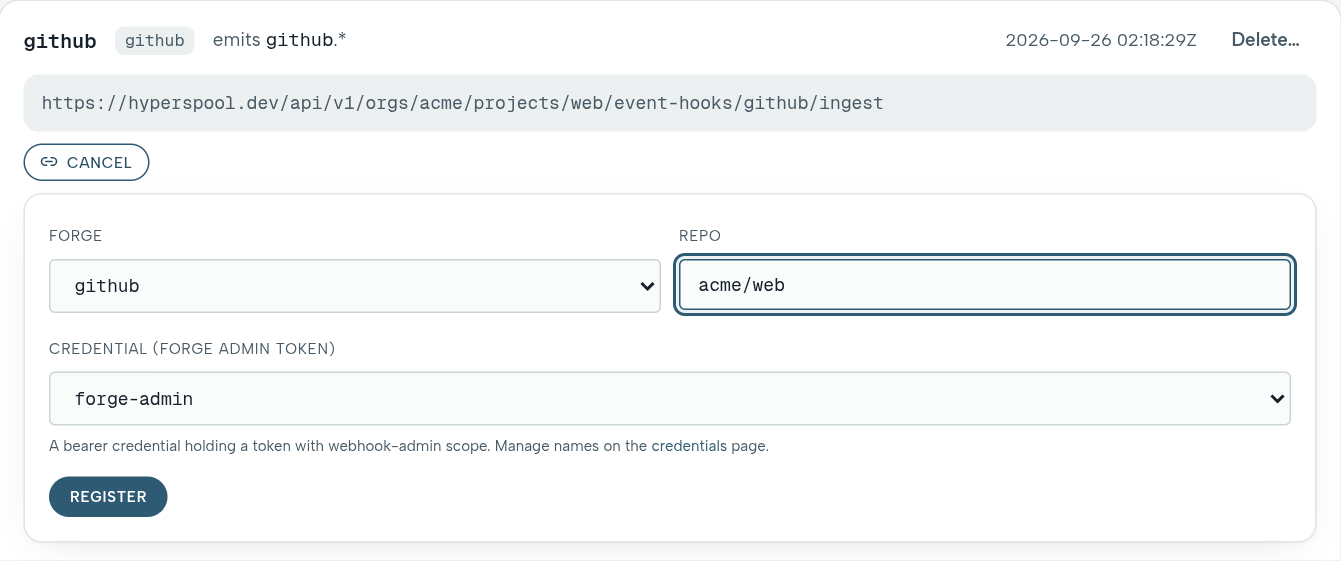
Gitea and Forgejo also ask for the instance’s API base: its URL plus
/api/v1. It has to be a publichttpsaddress, because Hyperspool sends the token there. A forge on a private network can’t be registered this way; paste instead.

Registering again updates the existing webhook rather than adding a second one.
The token is stored and can be used again, so check what it allows:
| Forge | Token that can create webhooks | What else it can do |
|---|---|---|
| GitHub | admin:repo_hook, or fine-grained Webhooks: read and write |
nothing else |
| Gitea | write:repository |
write to your repositories |
| Forgejo | any token | everything the user can do; Forgejo has no narrower scope |
On Forgejo, pasting is the only way that doesn’t give Hyperspool broad access to your account.
Check it worked
Section titled “Check it worked”The forge sends a test delivery when you save the webhook (GitHub’s is
a ping). spool webhook deliveries github, or Events in the
console (under More), lists recent deliveries and what each handler did
with them:
| Column | Values |
|---|---|
OUTCOME |
accepted, or refused_signature when the secret doesn’t match |
HANDLERS |
per handler: started, skipped_when (its filter declined, or the delivery is for another repo), when_error (its filter failed), refused or error |
Push something and you get two runs: the build handler’s, and the pipeline it started. A delivery that isn’t listed never reached Hyperspool; the forge’s webhook page shows the response it got.
Deliveries are deduplicated on the signed body, so redelivering a push that already worked starts nothing. Redeliver one that failed (a non-2xx response); to test again, push again.
Pull requests
Section titled “Pull requests”repo connect --pull-requests also builds pull requests, from branches
of the repo and from forks. The webhook must send Pull request events.
A build starts when a pull request is opened or reopened, and when it
gets a new head (synchronize, or synchronized on Gitea and
Forgejo). The head is fetched from refs/pull/<n>/head, which the forge
keeps for forks too, and the build runs the .spool/ files from that
commit. Its input is in the table above.
A new head cancels the build of the head before: each file’s builds of
one pull request share a cancel-running concurrency group, unless the
file declares concurrency: itself.
A pull request from a branch of the repo is also built by the push of that branch. To build each commit once, limit push builds to the default branch:
--when 'has(event.number) || event.ref == "refs/heads/main"'Who is trusted
Section titled “Who is trusted”| Delivery | GitHub | Gitea and Forgejo |
|---|---|---|
| Push | trusted | trusted |
| Pull request from a branch of the repo | trusted when its author is an owner, member or collaborator | untrusted |
| Pull request from a fork | untrusted | untrusted |
| Comment or review | trusted when its author is an owner, member or collaborator | untrusted |
Gitea and Forgejo send no author association to decide by. A bot, such as a dependency updater, has no association either, so its pull requests are untrusted until you vouch for it:
spool webhook set github --manifest github --trust-actor 'renovate[bot]'That trusts pull requests the bot authors, never one from a fork. The webhook keeps its signing secret, so nothing changes on the forge. List every actor you trust each time: the list you pass replaces the old one.
What an untrusted build gets
Section titled “What an untrusted build gets”- No project secrets, and a job that declares
credentials:fails. Keep tokens off the jobs a pull request needs, or mark such a joboptional_when_untrusted: trueto run it without the credential. - On managed environments, each of its steps runs in a fresh environment used for that one step.
- It builds the fork’s own
.spool/files, so the fork decides what runs. The two rules above are what keep that safe. - On a private repo, the clone itself needs the repo credential, so a
fork’s build can’t start and its pull request gets an
errorstatus. - A
--whenthat declines it posts noskippedstatus, since the fields the filter reads belong to the fork. - When its head is a commit the repo already built trusted, it posts no status, so the trusted result stands.
Secrets has the details.
Gitea and Forgejo
Section titled “Gitea and Forgejo”repo connect works the same for a repo on a Gitea or Forgejo server:
spool repo connect https://git.example.com/me/app \ --repo-credential git-read --status-credential git-status- The clone token needs
read:repository, and the status tokenwrite:repository. - Paste at the page
repo connectprints (the repo’s webhook settings): the URL and secret, HTTP methodPOST, content typeapplication/json, and the push and pull request events. Both forges send GitHub-shaped deliveries, so the same webhook kind handles them. - The webhook is named after the first part of the host, so for
git.example.comit isgit, and the events aregit.pushandgit.pull_request.opened. - Builds clone over the public internet. A forge on a private network needs an agent of your own that can reach it, since managed environments can’t.
Trust is stricter there; see who is trusted.
Run a pipeline on demand
Section titled “Run a pipeline on demand”spool submit --repo-path ci/deploy.yaml \ --repo me/app --repo-credential gh-read --ref mainThe server reads the file from the repo at --ref through the forge’s
API and runs it, so the run uses the definition from that commit. The
read needs a credential even for a public repo. It reads from GitHub
unless you pass --forge gitea or --forge forgejo, with the repo as a
URL on a host where you’ve connected a repo.
The run has no input.sha. It gets CI_TRIGGER_EVENT=manual, and
CI_TRIGGER_REF and CI_TRIGGER_SHA both set to the --ref you gave,
which is why the quickstart’s checkout falls back to $CI_TRIGGER_SHA.
A graph file gets repo, ref and sha as its input instead. A run
started this way posts no commit status.
When repo connect isn’t enough
Section titled “When repo connect isn’t enough”repo connect is a webhook plus two handlers, and you can add handlers of
your own on the same webhook: a second pipeline for tags, a nightly job
on the default branch, a router that decides from the changed paths.
Handlers on the same event type all run, each in its own run, and
--when keeps them apart.
This one builds .spool/release.yaml on version tags. Save it as
release.sh:
#!/usr/bin/env bashset -euo pipefailpath=.spool/release.yamlwork="$(mktemp -d)"trap 'rm -rf "$work"' EXIT
git clone --quiet --depth 1 \  "https://x-access-token:${GH_TOKEN}@github.com/${CI_TRIGGER_REPO}.git" "$work/repo"cd "$work/repo"git fetch --quiet --depth 1 origin "$CI_TRIGGER_SHA"git -c advice.detachedHead=false checkout --quiet "$CI_TRIGGER_SHA"
printf 'input: {"sha": "%s", "repo": "%s"}\n' "$CI_TRIGGER_SHA" "$CI_TRIGGER_REPO" > "$work/run.yaml"cat "$path" >> "$work/run.yaml"spool spawn "$work/run.yaml" \ --tag "repo:$CI_TRIGGER_REPO" --tag "sha:$CI_TRIGGER_SHA" \ --origin-repo "$CI_TRIGGER_REPO" --origin-path "$path" --origin-sha "$CI_TRIGGER_SHA"spool handler set app-release release.sh --as script \ --credential GH_TOKEN=gh-read \ --on github.push \ --when 'event.key == "me/app" && event.ref.startsWith("refs/tags/v")'A handler of your own sees every repo’s deliveries on the webhook, so
its --when names the repo with event.key.
A script handler gets the push’s fields as CI_TRIGGER_* variables
(CI_TRIGGER_SHA, CI_TRIGGER_REF, CI_TRIGGER_REPO,
CI_TRIGGER_SENDER, CI_TRIGGER_EVENT for the type) and the whole
event as JSON in the file $SPOOL_INPUT_FILE names. Read a value from a
variable, never by splicing it into the script: a branch name is chosen
by whoever pushes it. spool handler init prints starter routers.
The status handler also reports a run a trusted handler of yours spawns
with repo: and sha: tags, so the release run reports on the commit
too, under hyperspool/release from its --origin-path. A spawn keeps
those tags only when they name the repo and commit that were delivered,
so a script can’t point a status at another commit. Runs an untrusted
handler spawns, and anything a build spawns in turn, are not reported.
A handler can also take the pipeline file directly (spool handler set <name> ci.yaml --as pipeline --on github.push). That stores a copy of
the file as it is on your disk, so later edits in the repo are ignored,
and the status handler never hears about the runs it starts. Use it for
reactions that don’t build the commit, such as a notification; for
building, spawn from a checkout as above.
Events and handlers covers handlers in full.
A graph can also own a webhook of its own through a
webhook trigger node. That suits input
that isn’t a repo push, such as a form post or a vendor callback. For a
repo, use repo connect: one webhook per forge, and the filters in one
place.